Search

7 result(s) for “failover”

Products

Screens

Live and standby, side by side
Desktop client

Live and standby, side by side

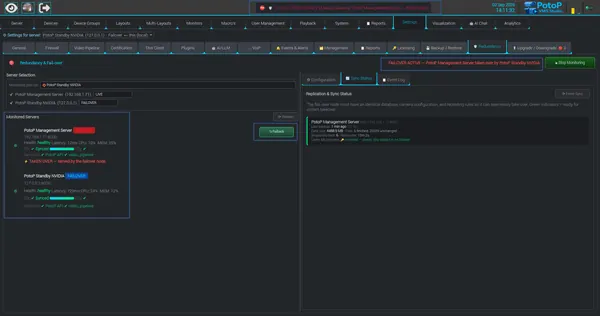
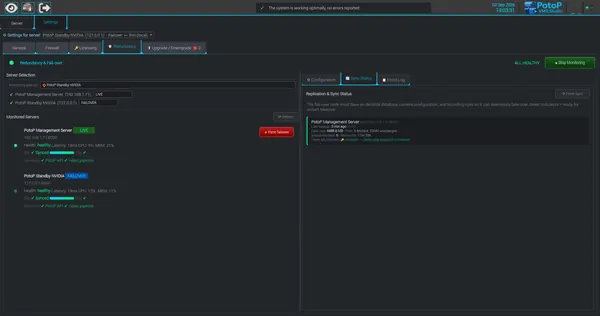
The Redundancy tab shows the live server and its failover node with health, latency, CPU and memory. Database and configuration sync status is shown per server, and user sessions are mirrored so clients stay logged in. Force Takeover is available from the same tab.

How it works

The Redundancy tab shows a management server and a failover node monitored by a heartbeat. Health, latency, CPU and memory come from probes of each server's API, and video pipeline status is checked as well. A replication agent on the failover node periodically pulls a full export of database and configuration from the live server. Only files whose checksum changed cross the network. Users and sessions are mirrored into the standby's own database, so existing login tokens stay valid there and clients remain signed in after a takeover.
PotoP VMS Studio · Failover & redundancy
Tune detection and backups
Desktop client

Tune detection and backups

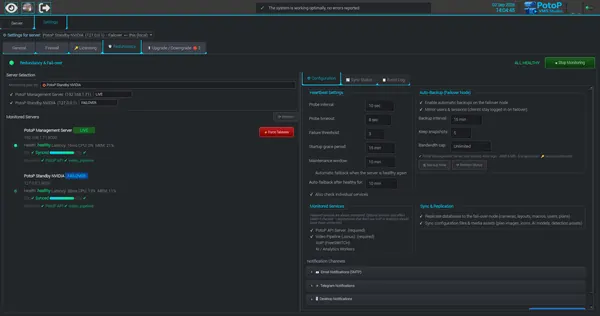
Set probe interval, timeout and failure threshold, and choose which services are monitored. Automatic backups, snapshot retention and a bandwidth cap control how the standby node stays in step, with optional e-mail, Telegram and desktop alerts.

How it works

The Configuration tab sets how failure is detected and how the standby stays current. The monitor probes each server at the probe interval, and a server is declared failed only after the configured number of consecutive failed probes. Required services are always monitored, while optional ones such as VoIP or analytics only count if ticked. Backup interval, number of snapshots kept and a bandwidth cap control the replication agent on the failover node. Alerts can go out by e-mail (SMTP), Telegram or desktop notification.

PotoP VMS Studio · Failover & redundancy
Replication running
Desktop client

Replication running

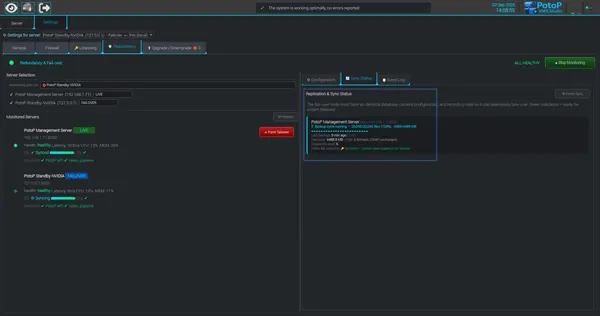
A backup cycle reports files and megabytes transferred while the standby shows its database as syncing. You can see at any moment how close the failover node is to the live server.

How it works

During a backup cycle the failover node requests a manifest of the live server's files and databases, then fetches only what changed since the previous snapshot. Unchanged files are linked from the previous copy, which is why the panel can show thousands of files with only a handful fetched. Progress in files and megabytes is written to a status record that the client shows live. The finished export is rotated into a snapshot folder, and the standby's database line reads Syncing while data is being applied.

PotoP VMS Studio · Failover & redundancy
Failover active, one click back
Desktop client

Failover active, one click back

When a server is taken over, the banner turns red, the live server is marked offline and its cameras are served by the failover node. A single Failback button returns the work when the original server is healthy again.

How it works

A takeover happens automatically when the failure threshold is reached, or manually with Force Takeover. The standby then serves the failed server's cameras, the failed server is marked offline, and the banner and top status line turn red. When the original server answers its probes again, Failback moves the cameras home. The Configuration tab can also do this automatically after the server has been healthy for a set number of minutes. Clients keep working because users and sessions were already mirrored to the standby.

PotoP VMS Studio · Failover & redundancy
A clear failover event log
Desktop client

A clear failover event log

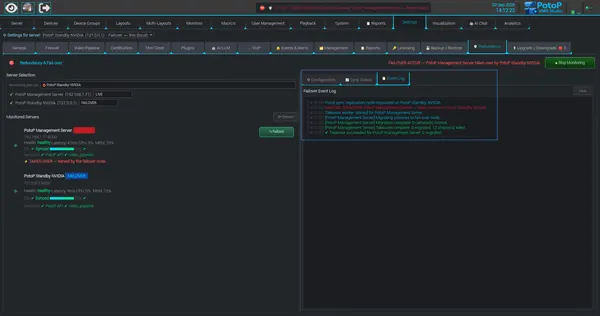
Every step of a takeover is logged with a timestamp: replication, camera migration, streams stopped and the final result. The record helps operators verify what happened and document it afterwards.

How it works

The Event Log tab records each step of the redundancy process as it happens, with a local time stamp: a forced replication cycle, the takeover request, the start of the takeover worker, camera migration, the number of streams stopped on the failed server and the final result. The entries come from the server's takeover sequence and are kept for the session, with a Clear button. Because every transition is written in order, an operator can check afterwards what the system did and copy it into an incident report.

PotoP VMS Studio · Failover & redundancy

News