Search

15 result(s) for “certificate”

Products

Screens

Events that start macros
Desktop client

Events that start macros

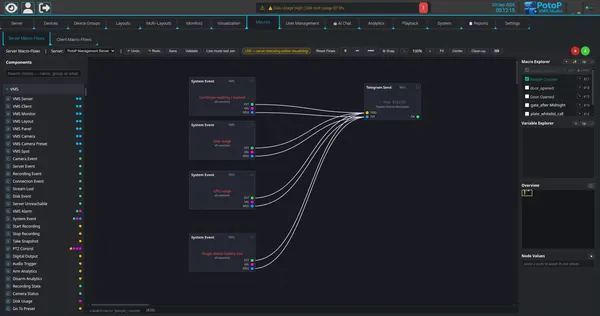
System events such as certificate expiry, disk usage or device battery low can start a macro flow. Here four events feed a Telegram message node, all built visually without code.

How it works

The macro editor is a visual node graph that runs on the server. A System Event node fires when the health monitor raises a matching event, such as a certificate about to expire, high disk or GPU usage or a low device battery, and passes the event text and value on its output ports. Wired into a Telegram Send node, it posts a message through the Telegram bot API. The graph is checked with Validate, can be simulated, and while it is live the editor shows the values passing through each node.
PotoP VMS Studio · Reports & events
TLS status at a glance
Web client

TLS status at a glance

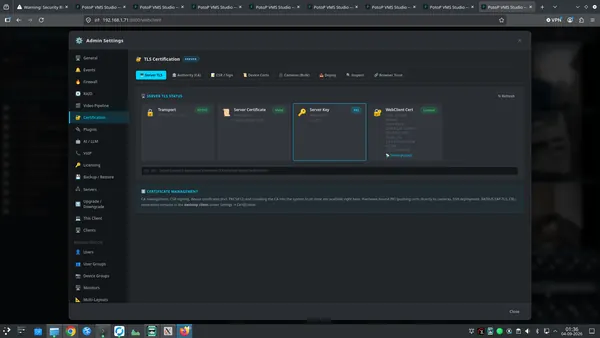
The web admin panel shows transport, server certificate validity, server key and the loaded web-client certificate together with its fingerprint. Operators can confirm within seconds that the system is encrypted and when a certificate expires.

How it works

The web admin panel asks the server for its current TLS state and shows four cards: the transport in use (HTTPS with TLS 1.2 or 1.3), the server certificate and its expiry date, the type and size of the server key, and the certificate loaded for browsers with its SHA-256 fingerprint. The same expiry data feeds a background watcher that raises events for the server, the certificate authority, peer servers and cameras before anything expires, so alerts can go to macros, e-mail or Telegram.

PotoP VMS Studio · Certificates & security
Your own certificate authority
Web client

Your own certificate authority

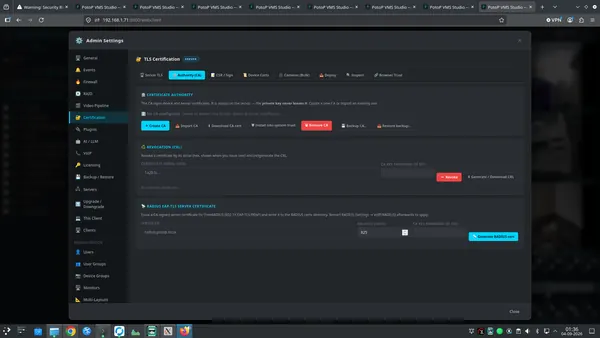
The system can create or import a certificate authority, download its certificate, back it up and revoke certificates through a CRL. The CA private key stays on the server. Devices and clients then trust one root that you control.

How it works

The server can generate a certificate authority or import an existing one. The CA certificate and its private key are stored on the server, with the key file readable only by the service account and optionally protected by a password, and only signed certificates leave the machine. The tab also downloads the CA certificate, backs it up and restores it, installs it into the system trust store, revokes certificates by serial number and builds a revocation list (CRL). A RADIUS server certificate for 802.1X can be issued from the same CA.

PotoP VMS Studio · Certificates & security
Issue device certificates
Web client

Issue device certificates

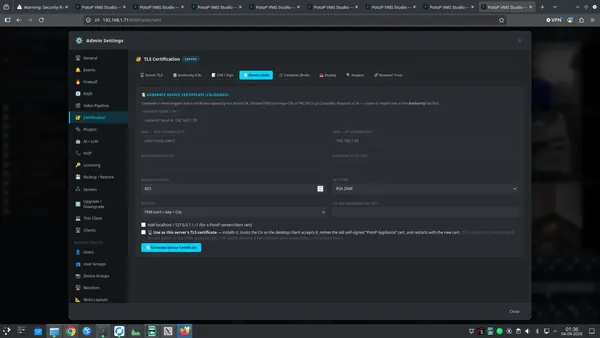
A device certificate is generated and signed by the stored CA for a name and IP address, with a validity period and a choice of output format. It can also be installed as the server certificate, removing browser warnings.

How it works

A new key pair is generated and a certificate is signed by the stored CA for the given name, DNS and IP entries, with a chosen validity and key type. The result is offered as PEM (certificate, key and CA) or as a PKCS#12 bundle. Ticking the server option installs the certificate as the server's own, trusts the CA for the desktop client, retires the old self-signed one and restarts the service, so browsers stop showing warnings once they trust the CA.

PotoP VMS Studio · Certificates & security
Bulk HTTPS for cameras
Web client

Bulk HTTPS for cameras

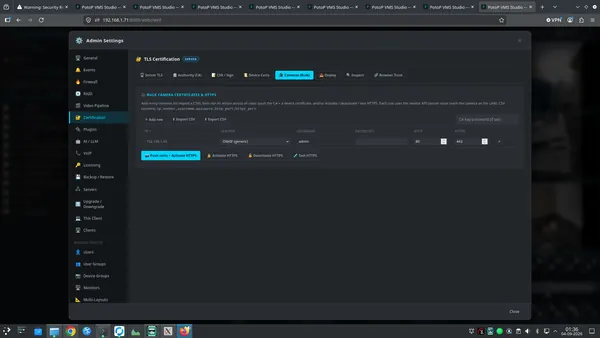
Cameras are listed or imported from CSV, then certificates are pushed and HTTPS is activated on all of them in one run. Vendor APIs are used, so no one has to log in to each camera separately.

How it works

You list cameras by hand or import a CSV with address, vendor, credentials and ports. For each row the server issues a device certificate from the CA, and pushes the certificate and CA to the camera through that vendor's own web API, then switches on HTTPS. There are also actions to deactivate HTTPS and to test it. The server must reach the cameras on the network, and credentials are used only for the run. The result is one pass instead of logging in to every camera.

PotoP VMS Studio · Certificates & security
Push certificates to cameras
Web client

Push certificates to cameras

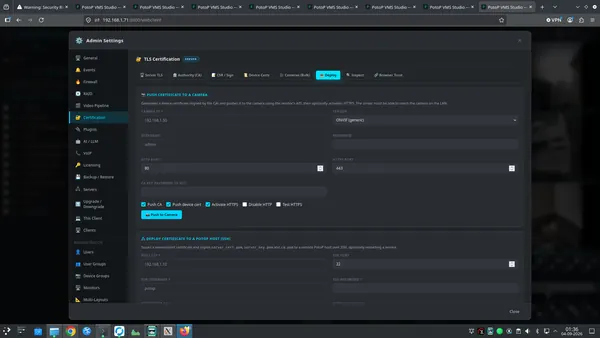
A signed certificate can be pushed to a single camera, with options to push the CA, activate HTTPS, disable plain HTTP and test the connection. Below it, a second section deploys certificates to another PotoP host over SSH.

How it works

For one camera, the server signs a device certificate, uploads it with the vendor's API, can push the CA, activate HTTPS, disable plain HTTP and test the secure connection. The second section connects to another PotoP host over SSH, copies the certificate, key and CA file to the destination directory and can restart a service. Both operations run on the server, so it must be able to reach the target, and they need administrator rights.

PotoP VMS Studio · Certificates & security
Trust on browsers and phones
Web client

Trust on browsers and phones

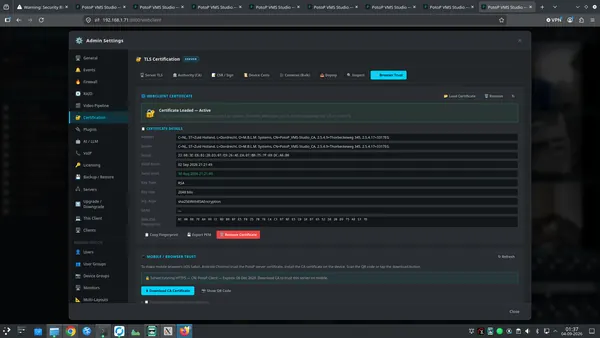
The active web-client certificate is shown with subject, validity, key size and fingerprint. A download and QR code let phones and tablets trust the server, while an install script does the same for Linux, macOS and Windows.

How it works

The panel shows the certificate currently loaded for the web client with subject, issuer, validity, key type and size, signature algorithm and SHA-256 fingerprint, and can export it as PEM. The mobile section serves the CA certificate for download, or as a QR code that a phone or tablet can scan, so the device can trust the server once and stop warning. Installation instructions and scripts are provided for Linux, macOS and Windows.

PotoP VMS Studio · Certificates & security
Verified connection at sign-in
Web client

Verified connection at sign-in

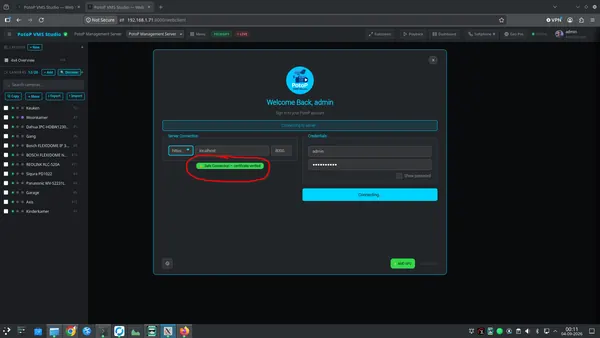
The sign-in screen confirms with a green message that the connection is safe and the certificate is verified before credentials are sent. Users can trust the server they are connecting to.

How it works

Before the password is sent, the sign-in page contacts the chosen server over HTTPS and checks the certificate against the browser's trust store. If the chain is valid and matches, the green Safe Connection message appears, otherwise the user sees a warning. That check is done by the browser's own TLS stack, so it cannot be faked by the page. The credentials are then sent to the verified server over the encrypted connection.

PotoP VMS Studio · Certificates & security
Ask your system in plain language
Web client

Ask your system in plain language

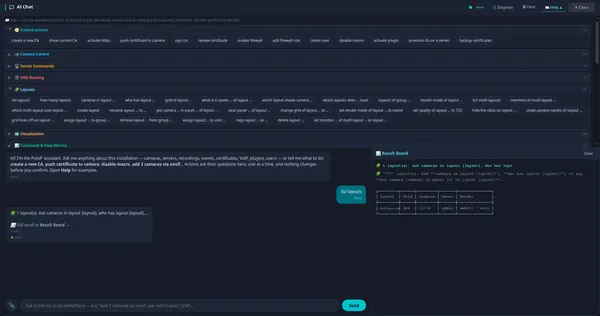
The AI chat offers guided actions for layouts, cameras, servers, certificates, firewall, users and macros. Click an example or type your own request, and results appear on a separate Result Board.

How it works

The AI Chat is built into the web client and the desktop client. Most requests are understood by a rule-based command engine on the server, marked direct in the chat, which maps phrases like list layouts to the same functions the user interface calls. The Help panel lists example phrases per topic. Actions that change things, such as creating a CA or pushing certificates, ask their questions step by step and change nothing until you confirm. Large answers go to the Result Board so the conversation stays readable.

PotoP VMS Studio · AI assistant
Certificate expiry tracking
PES web app

Certificate expiry tracking

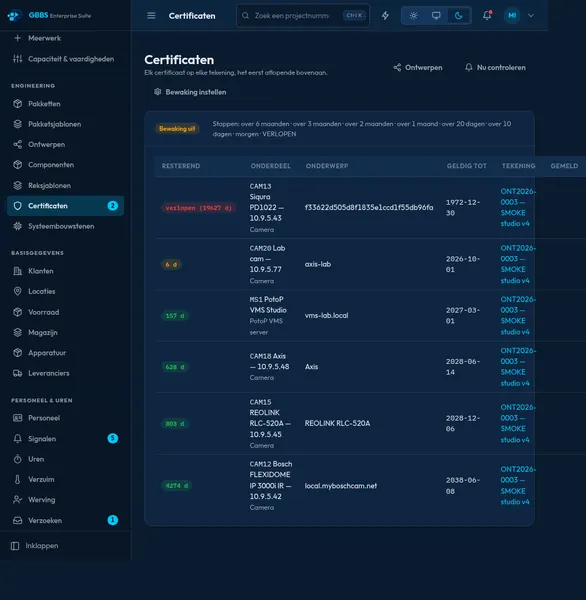
Every certificate across all drawings is listed with the remaining days, soonest first. Expired and nearly expired ones stand out, so renewals are planned rather than discovered.

How it works

Any part on any drawing can carry a certificate end date, and this page collects all of them across the company with one query, sorted by remaining days. A background job checks the dates every day and sends warnings at six, three, two and one month, then at twenty, ten and one day before the end, and once after expiry. Warnings go by e-mail, Telegram and inside the suite to people who may edit drawings. Each warning step is recorded on the item itself, so a restart or a second run never repeats it.

PotoP Enterprise Suite · Engineering

News

Pages