PotoP API Translator

Replace the video system, keep every integration

A PLC, a video wall controller, a building management system or a PSIM keeps sending the commands it always sent. The API Translator carries each one out on PotoP VMS Studio and answers in the shape the other system expects — TKH VDG Sense, Commend ICX, Milestone XProtect and Genetec Security Center, command for command.

Made in the EU Runs on your own servers

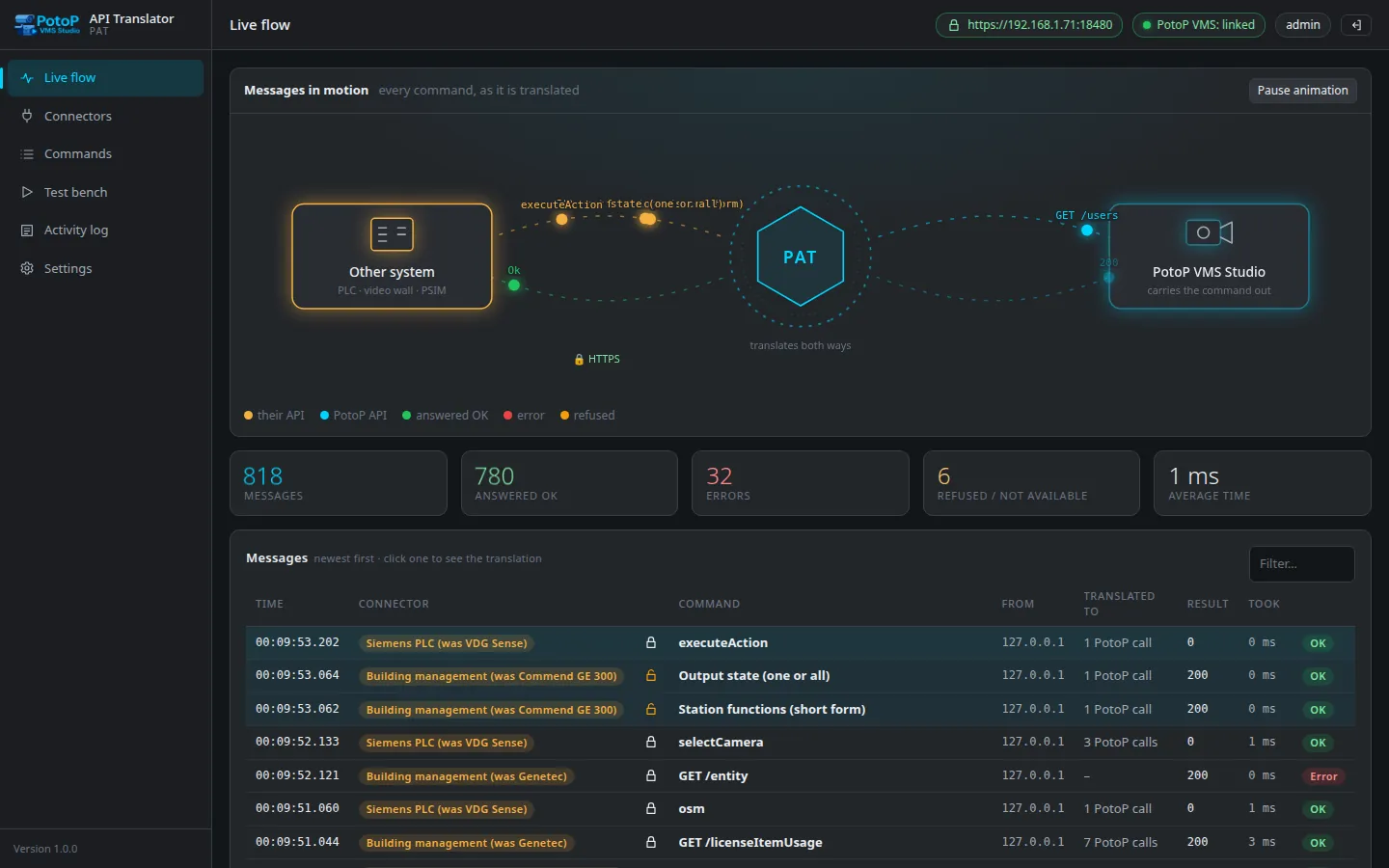
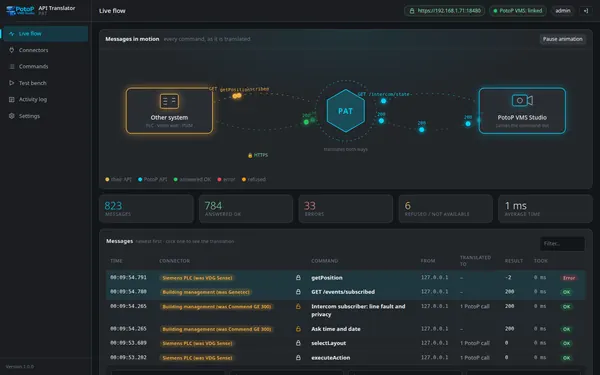
Live flow: every command as it is translated

Command for command

Every command of the other system's API, translated to PotoP VMS Studio calls — the table is generated from the code.

Four connectors

TKH VDG Sense, Commend ICX, Milestone XProtect (MIP VMS API) and Genetec Security Center (Web SDK).

Live flow

Watch each message travel from the other system through the translator to the VMS and back, with every step.

Test bench

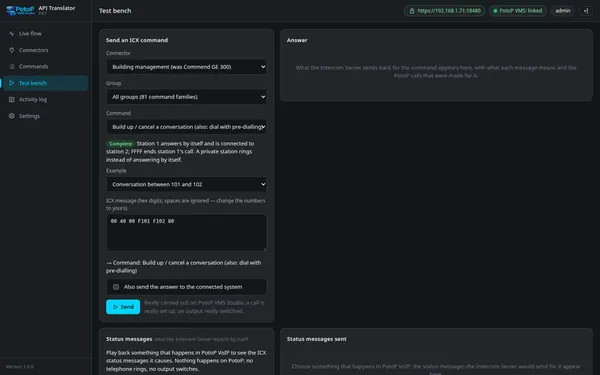
Send any command the way the other system would; it is really carried out on PotoP, with the answer and the calls made.

Never a pretended success

What PotoP cannot do is answered with the other system's own error code, so a PLC is never misled.

The VMS server's own certificate

Every port serves the PotoP server certificate; accounts, allowed addresses, rate limits and permission groups per connector.

One address changes, nothing else

Rewriting an integration is the expensive part of replacing a video management system, and often the part nobody owns any more. The PotoP API Translator removes it. The other system is given a new address and keeps speaking its own API; the translator translates every command to the PotoP VMS Studio API, carries it out, and translates the answer back. Nothing is pretended: when PotoP has no equivalent of something, the answer says so in the other system's own vocabulary — never a fake success that makes a PLC believe a door opened.

Four systems, every command documented

All 71 documented commands of the TKH VDG Sense HTTP/XML API, all 81 command families of the Commend ICX protocol, 75 resources of Milestone's MIP VMS API and the Genetec Security Center Web SDK — each listed on the console's Commands page with the PotoP call it becomes and what differs. A live flow view shows every message as it is translated, and a test bench carries any command out for real before the switch-over.

Built for the PotoP VMS Studio replacement

The translator exists for one moment: the day a Sense, Milestone, Genetec or Commend system is replaced by PotoP VMS Studio and the integrations around it must keep working.

PotoP VMS Studio

The VMS does the work

Cameras, PTZ, recordings, exports, layouts, macros, alarms, users and the intercom services are PotoP's; the translator only speaks the other system's language to them.

Alarms in PotoP's register

An alarm sent in by Milestone or Genetec is a real PotoP alarm with a number, a state and a history — and what PotoP operators change comes back.

Intercom on PotoP VoIP

A management system that controlled a Commend Intercom Server over ICX controls PotoP VoIP the same way: calls, outputs, inputs, PA, conferences, call requests.

Feature tour

Every screen below is a real screenshot. Search for a feature or pick a chapter; click a picture to see it full size and page through them with the arrow keys.

01

Linked to the VMS 4 screens

Sign in as a PotoP administrator, link with one button, and watch every translation live.

Live flow: every command as it is translated
Highlight API Translator console

Live flow: every command as it is translated

The console's front page draws each message travelling from the other system through the translator to PotoP VMS Studio and back, counts answers, errors and refusals, and lists every message newest first.

How it works

The page is fed by a server-sent event stream from the translator: every request that arrives on any connector port is one flow record — the command, the PotoP REST calls made for it and the answer — pushed to the browser as it happens, so nothing is polled and nothing is missed. The animation and the counters are drawn from the same records as the table, and the last five hundred flows stay in memory for the session. Passwords, session keys, tokens and digests are masked before a flow is kept, so the page can be left open on a control-room screen.

One translation, opened
API Translator console

One translation, opened

Click a row and the whole translation unfolds: the request as it arrived, each PotoP REST call made for it with its status and time, and the answer that went back — secrets masked.

How it works

A flow opens into three parts: the request exactly as the other system sent it (method, URL, body), the PotoP steps — each REST call with its path, status code and the milliseconds it took — and the answer that went back in the other system's own format. The outcome is one of ok, error, refused or unsupported, and that is what the counters add up. The detail is the fastest way to learn what a vendor's command really does on PotoP, which is why the test bench opens the same view for the commands you send yourself.
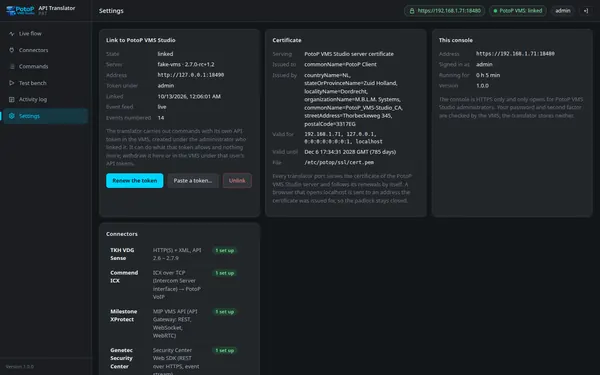
Settings: the link, the certificate, the console
API Translator console

Settings: the link, the certificate, the console

The translator works with an API token of its own under the administrator who linked it; the page shows the server, the event feed, the certificate it serves and which connector kinds are ready.

How it works

Linking asks PotoP VMS Studio for an API token named after the translator with a fixed preset of rights, made under the administrator who pressed the button; the token is stored encrypted and can be withdrawn here or in the VMS. The same page shows the event feed the translator keeps open to number every PotoP event, the certificate it serves on every port (the VMS server's own, followed through renewals, or a stand-in it made itself) and, per connector kind, whether it is ready, how many are set up, or that it is not built yet.

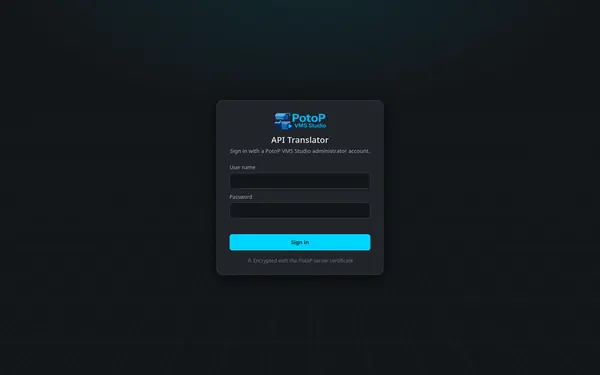
Sign in with a PotoP administrator account
API Translator console

Sign in with a PotoP administrator account

The console signs you in against PotoP VMS Studio itself, two-step code included; only administrators get in, over the server's own certificate.

How it works

There is no user list in the translator. The sign-in form posts to the VMS's own login, honours two-step sign-in, and then checks that the account is an administrator; anyone else is refused in words. The session is a strict cookie for this browser with a sliding thirty-minute life, every change carries a CSRF header, and eight failed attempts from one address in five minutes pause that address. The page is served over the PotoP server certificate, and a browser that opens localhost is redirected to a name the certificate was issued for.

02

Connectors 7 screens

One card per connected system: ports, accounts, security, the numbers it was programmed with, behaviour.

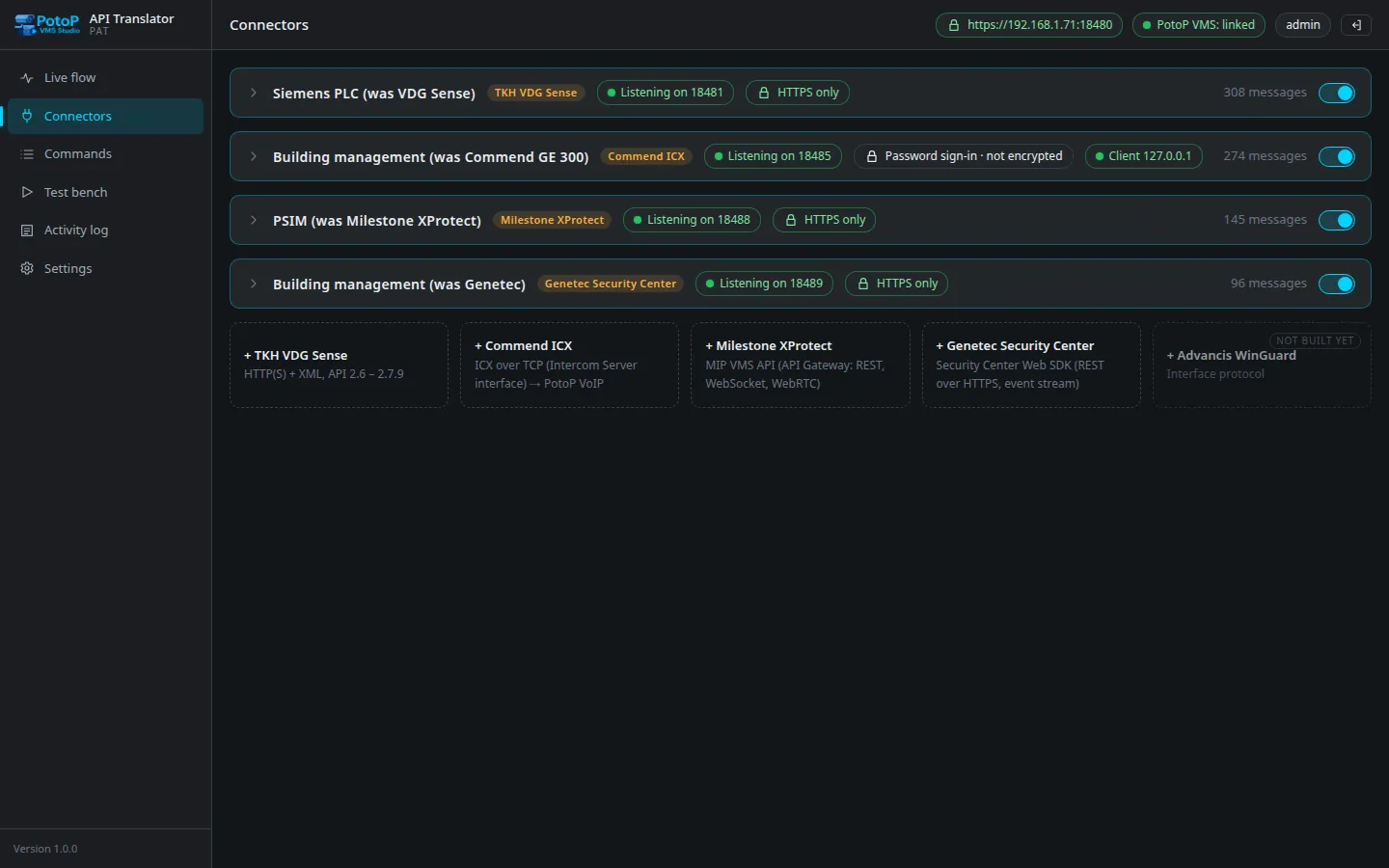
One card per connected system
Highlight API Translator console

One card per connected system

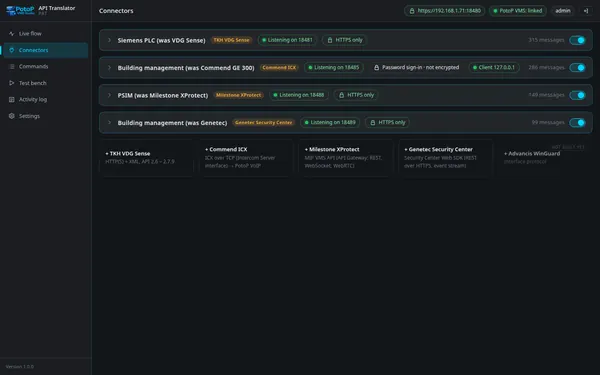
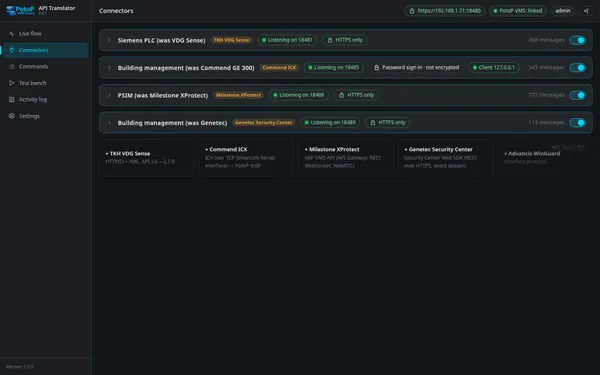
Four connectors — a PLC that speaks VDG Sense, a building management system on Commend ICX, a PSIM built for Milestone, one for Genetec — each with its ports, encryption state, message count and a switch.

How it works

Each card is one other system: its kind decides the protocol spoken on its ports — HTTP and XML for Sense, raw TCP for Commend ICX, REST and WebSocket for Milestone, REST and a multipart event stream for Genetec. The chips show whether it is listening, whether plain HTTP was allowed, for ICX which client is connected, and how many messages it has handled. The switch starts and stops the listener without losing settings; a connector never runs without an account, and adding one is a button per kind below the cards.

Sense: the address to give the other system
API Translator console

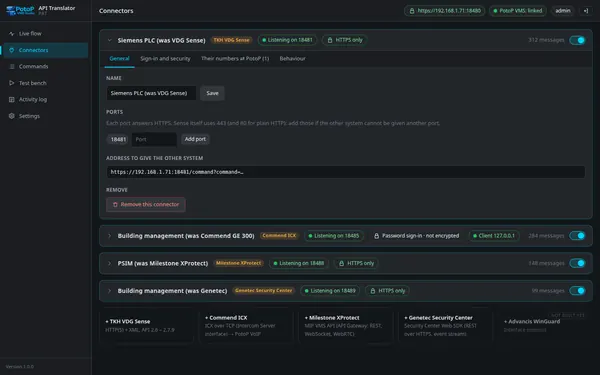
Sense: the address to give the other system

A connector's General tab: its name, the ports it listens on and the exact address the other system is pointed at — the only thing that changes on their side.

How it works

The translator serves the VMS server's certificate on every connector port and follows its renewals, so the address under General works over HTTPS the moment it is typed into the PLC or the management system. Ports are tags: a second one — 443 or 80 for a system that cannot be given another — is added without a restart, and ports the PotoP server itself uses are refused with the reason. Remove this connector asks for a confirmation and is written to the activity log under your name.

Sign-in and security per connector
API Translator console

Sign-in and security per connector

Accounts with a random password shown once, plain HTTP only after a recorded decision, allowed addresses, a rate per address, and the groups that say what the connector may do.

How it works

Add account generates an eighteen-character password shown once; only a scrypt hash is kept, checked beside the service's main loop with a short memo so a system that signs in on every request costs nothing extra. Ten wrong passwords pause that name from that address for five minutes. Allow plain HTTP opens a warning you must accept by name, and HTTPS keeps working on the same port. The groups below are permissions per connector: a command whose group is off is refused in the other system's own vocabulary, Change settings is off by default.

Their numbers ⇄ PotoP
API Translator console

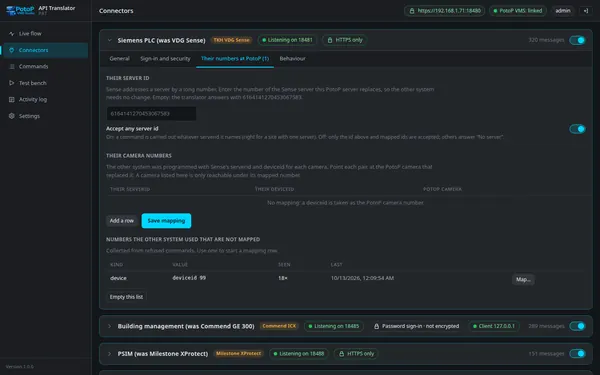
Their numbers ⇄ PotoP

The old system's server and device ids are mapped to PotoP cameras; numbers the other system used that are not mapped collect in a list with a Map… button, so the setup is driven by what really arrives.

How it works

A Sense integration addresses a server by a long number and a camera by a device id, both from the installation that was replaced. The map gives each pair its PotoP camera; without a mapping the device id is taken as the PotoP camera number, and a mapped camera is reachable only under its mapped number. Commands that named an unknown number are not guessed: the number is collected in the list below with how often and when last, and Map… starts a mapping row from it — let the other system run for a minute and the list says what it still expects.

ICX: stations, outputs, inputs, cameras, monitors
API Translator console

ICX: stations, outputs, inputs, cameras, monitors

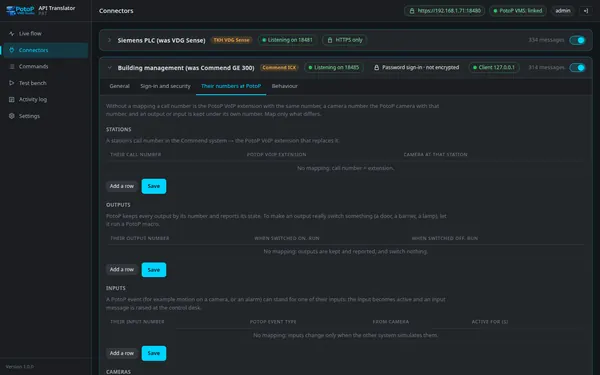
For a Commend ICX connector the map tab links call numbers to PotoP VoIP extensions, outputs to macros, PotoP events to inputs and monitors to layout panels.

How it works

ICX speaks in call numbers, output and input numbers, camera and monitor numbers. A call number is the PotoP VoIP extension of the same number unless mapped; an output becomes real when a PotoP macro is named for on and off; an input is pulsed by a PotoP event type, optionally of one camera, for a number of seconds; a monitor is a PotoP layout and the panel the camera is put on. Below the tables the connector lists task and type pairs it received and has no handler for, so a missing feature is seen rather than guessed.

Milestone: the GUIDs the integration was programmed with
API Translator console

Milestone: the GUIDs the integration was programmed with

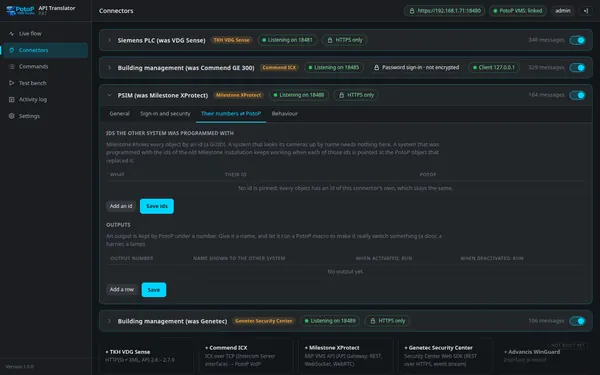
An integration that has Milestone's ids built in pins each GUID to the PotoP camera, output, macro, event type or layout that replaced it; one that looks things up by name needs nothing here.

How it works

The connector answers Milestone's configuration API with ids of its own, stable across restarts. An integration that looks cameras, outputs or event types up by name therefore works unchanged; one that was programmed with the GUIDs of the old XProtect installation pins them here, each to the PotoP object that replaced it, with the id type chosen from cameras, hardware, recording servers, outputs, input events, user-defined events, event types, views, basic users and roles. Outputs get a number, a name and a PotoP macro so that triggering one really switches something.

Genetec: how things are carried over
API Translator console

Genetec: how things are carried over

A read-only explanation per connector of what becomes what on PotoP — alarms, video protection, recording, events — and which Security Center entities PotoP does not have.

How it works

PotoP is a video system, and the page says so plainly: alarms land in PotoP's alarm register with the instance id equal to the PotoP alarm number, video protection is a footage hold, recording is PotoP's manual recording, events are published under Security Center's names. Access control, intrusion, LPR patrol and parking have no counterpart — their entities are kept, their reports answer Ok with an empty list, their actions answer Fail with a message that says why — and nothing is ever pretended to have happened.

03

Every command, translated 4 screens

The Commands page: every command of each system and the PotoP call it becomes.

TKH VDG Sense: all 71 commands
Highlight API Translator console

TKH VDG Sense: all 71 commands

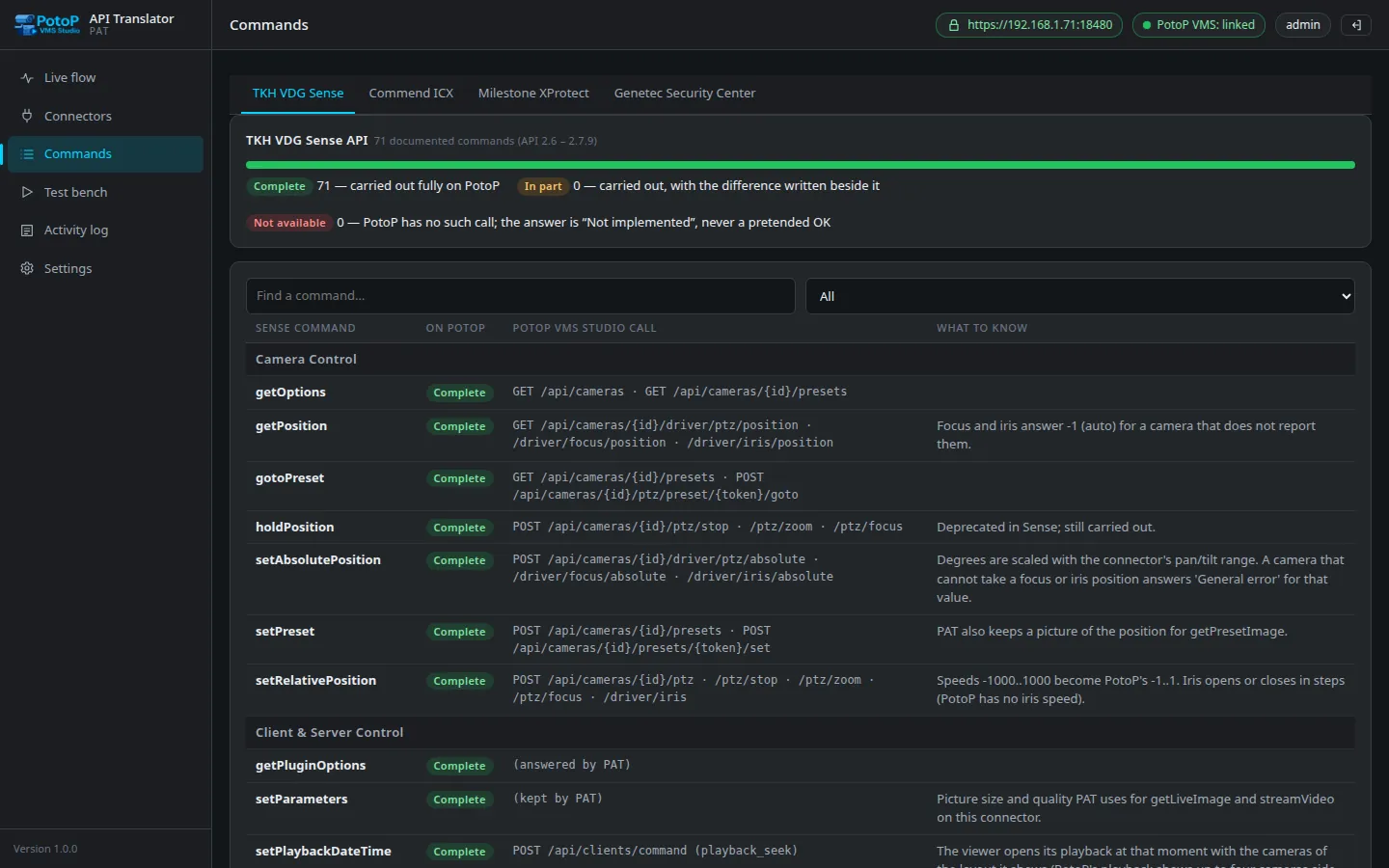
The Commands page is the authority: every documented Sense command, how far PotoP covers it, the PotoP VMS Studio call it becomes and what differs — 71 of 71 carried out completely.

How it works

The table is generated from the connector's own command registry, the same one that serves the requests, so the page can never list a command the translator does not have. Each row names the Sense command, the coverage, the PotoP VMS Studio calls it becomes — a PTZ move is a POST to the camera's ptz endpoint with speeds scaled from Sense's thousandths, a clip is a PotoP export with VCA data as a timed text track — and what to know, such as a command removed from Sense years ago that is still answered for old callers. The filter narrows it to complete, in part or not available.

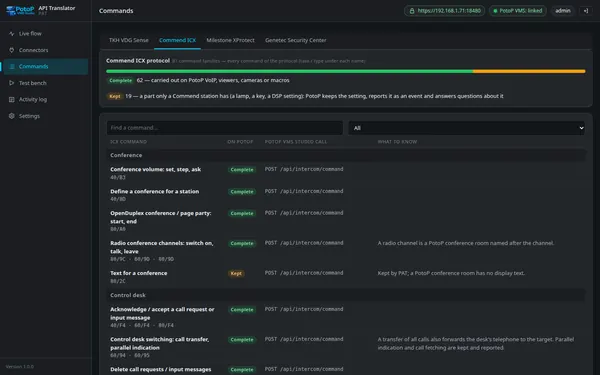
Commend ICX: 81 command families
API Translator console

Commend ICX: 81 command families

Every task and type of the ICX protocol under its family: 62 carried out on PotoP VoIP, viewers, cameras or macros, 19 kept and reported the way an Intercom Server would.

How it works

Each family carries its ICX task and type codes under the name, so a protocol engineer can look up 40/80 or 80/AC directly. Almost every family becomes one op of the VMS's intercom command endpoint — call, hangup, dtmf, busy, privacy, page, conference, output, input, door code, request, desk — and the note says what differs: privacy honoured per call, simplex mode reported but not enforced, a radio channel as a conference room. Kept families are the parts only a Commend station has, which PotoP stores per station and reports as an event.

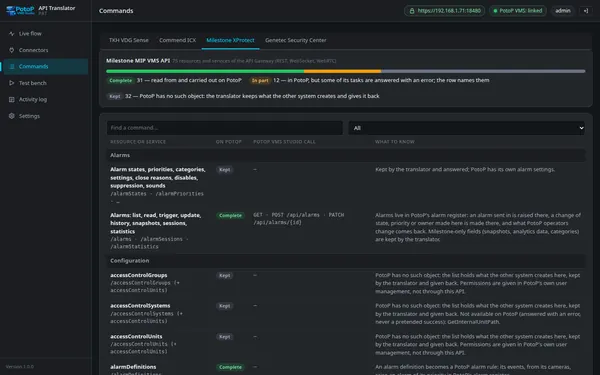
Milestone MIP VMS API: 75 resources
API Translator console

Milestone MIP VMS API: 75 resources

Sign-in, events, alarms, bookmarks, evidence locks, WebRTC and all configuration resource types, each marked complete, in part or kept — and the tasks PotoP cannot do, answered with an error, never a pretended success.

How it works

The 75 rows cover the sign-in endpoints, the events and messaging WebSockets, alarms, bookmarks, evidence locks, WebRTC and every configuration resource type of the published MIP VMS API. Complete rows are backed by PotoP (cameras, recording servers, outputs, user-defined events as macros, views as layouts, basic users and roles as real users and groups); kept rows store what the other system creates and give it back with ids of their own; and every task PotoP cannot perform — truncating storage, changing a device password, replacing hardware — is listed as answered with an error rather than a pretended success.

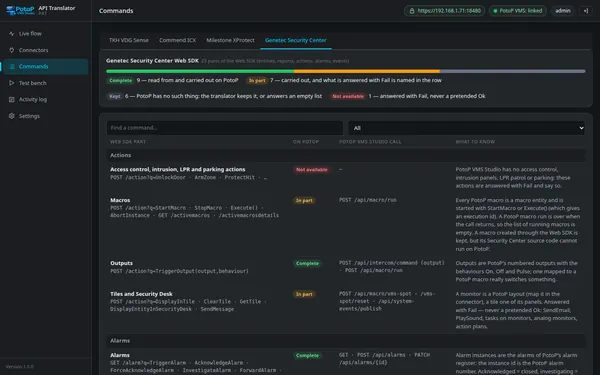
Genetec Web SDK: entities, actions, alarms, events
API Translator console

Genetec Web SDK: entities, actions, alarms, events

The Web SDK's entities, camera methods, PTZ, outputs, tiles, alarms, event stream and reports with their PotoP counterparts — and the access-control and intrusion parts that answer Fail honestly.

How it works

The Web SDK is answered with its own q= method-call syntax, JSON or XML in the modern or legacy form as the Accept header asks. Entities come from PotoP's cameras, servers, users, groups, macros and intercom state with the logical id equal to the PotoP number; camera methods, PTZ, outputs, tiles and alarms map to the calls shown; the event stream carries PotoP's feed under 37 Security Center event names. The rows for access control, intrusion, LPR and parking are the honest ones: kept entities, empty reports, and actions that fail with a reason.

04

Test bench and log 3 screens

Carry a command out for real before the switch-over, and read the trail afterwards.

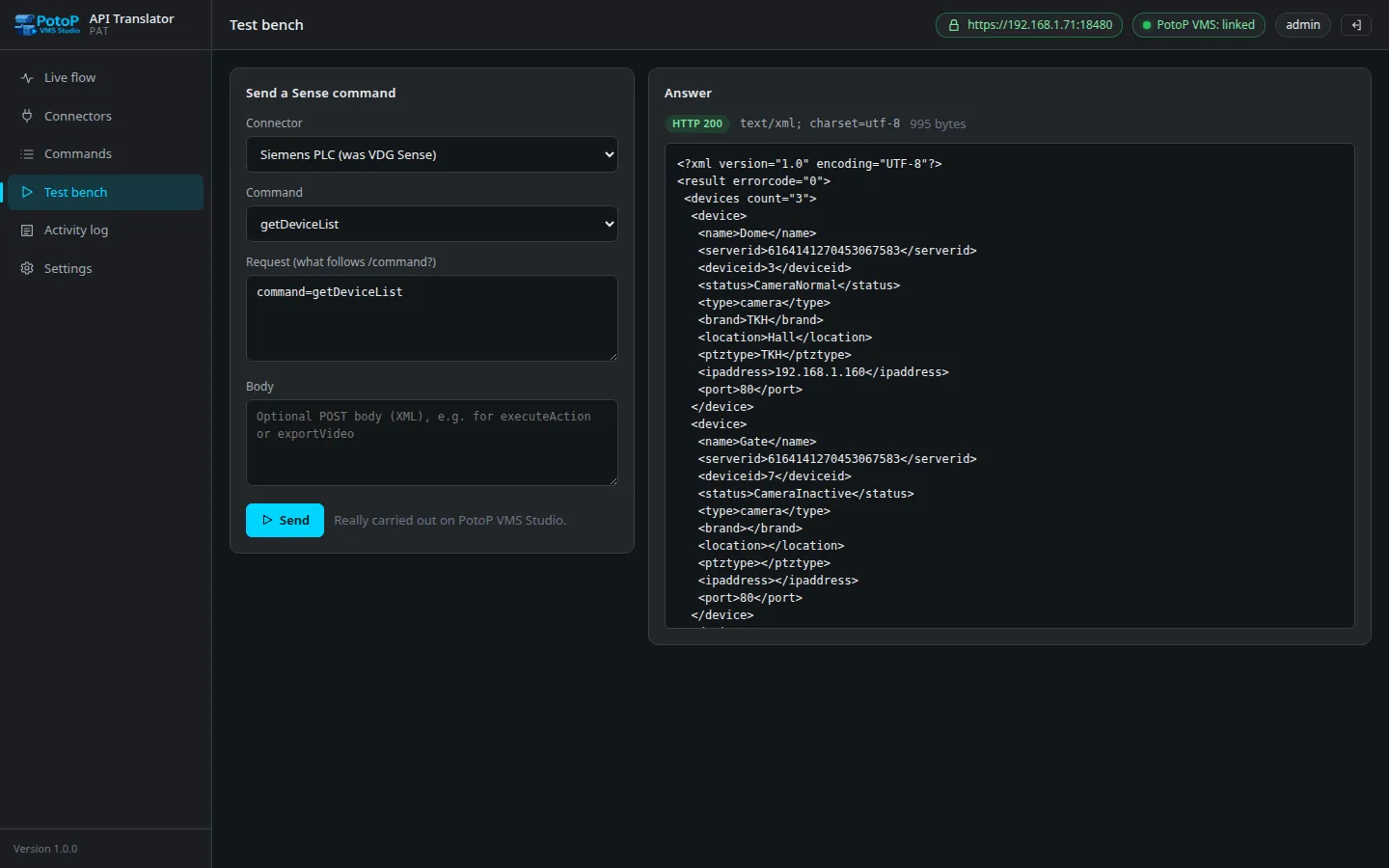
Test bench: a Sense command, really carried out
Highlight API Translator console

Test bench: a Sense command, really carried out

Send any command the way the other system would and read the answer, pictures included; the translator signs in for you and the command is really executed on PotoP VMS Studio.

How it works

The bench signs in on a one-command key, so no account of the other system is needed to try something, and the request travels the same path a PLC's would: the connector parses it, maps the numbers, makes the PotoP calls and formats the XML answer. Pictures come back inline — a live image, a preset picture, an export status — and the flow appears on Live flow at the same moment with every step. It is the recommended order of work: link, add the connector and an account, send one command here, watch it, then switch the other system over.

ICX test bench with ready examples
API Translator console

ICX test bench with ready examples

Every ICX command family with example messages, the answer message by message with its meaning, the PotoP calls made — and a status-message simulator for what PotoP VoIP would report.

How it works

ICX is binary, so the bench offers every command family with worked examples whose numbers you change to yours, shows the hex message it will send and decodes each answer frame into words beside the PotoP calls that produced it. The second part simulates what happens in PotoP VoIP — a call rings, is answered, ends, a station drops off, an output switches, a call request is raised — and prints the ICX status messages the connector would emit; they reach the connected system only when the box is ticked, and that is written to the activity log. The third part is the live wire, every frame in and out.

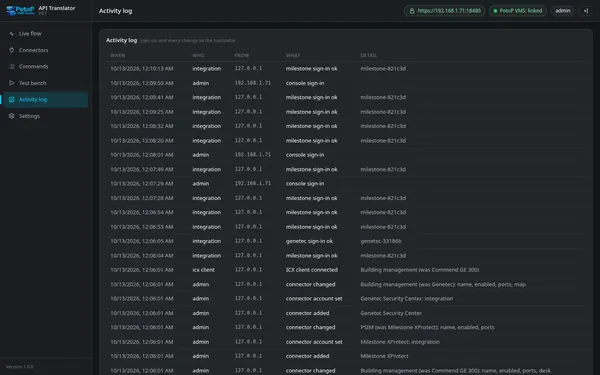
Activity log
API Translator console

Activity log

Who signed in, every change to a connector, every refused sign-in of another system and every message the bench sent to a connected system — the trail an auditor reads.

How it works

The log is the translator's own audit table, kept beside the event journal in its SQLite file: console sign-ins with their address, every connector change with the field and the person, refused sign-ins of other systems once per address, name and reason in five minutes, ICX clients turned away, and every status message the bench pushed to a live system. What the translator's token did on the VMS is recorded there too, in PotoP's audit trail under the token's name, so the two books together answer who did what on which side.

Under the hood

How PotoP API Translator is built, where it runs and how it keeps your data safe.

01

Its own service beside the VMS

The translator is a separate service on the PotoP server, like Cockpit, never part of the VMS process. It listens on the ports the other systems were given — 8471 for Sense, 18000 for ICX, 8472 for Milestone, 4590 for Genetec by default, 443 or 80 when a system cannot be given another — and talks to the VMS over the ordinary PotoP REST API.

02

An API token, not a password

Linking creates an API token under the administrator who linked it, with a fixed preset of rights and nothing more; it is stored encrypted and can be withdrawn on either side. The translator never holds a VMS password, and connector passwords are kept as scrypt hashes.

03

The server certificate on every port

Each connector port serves the certificate of the PotoP VMS Studio server and follows its renewals; TLS 1.2 is the minimum. Plain HTTP is answered only after an administrator switched it on for a connector and accepted the warning, recorded under their name.

04

Their numbers, mapped

Server ids, device ids, GUIDs and call numbers of the old installation are mapped to PotoP cameras, outputs, macros, layouts and extensions; without a mapping a number is taken as the PotoP number. Numbers the other system used that are not mapped are collected, never guessed.

05

Events numbered as they arrive

The translator keeps the VMS event feed open and numbers every event in its own journal, so Sense event polling, Milestone event sessions and the Genetec event stream can be answered the way those systems expect, with PotoP's event types under each system's own names.

06

Licensed per server

The API Translator is the licensed module api_translator of PotoP VMS Studio, available on every licence type as an add-on. Without it the service opens no port, and the tray shows nothing of it.

Want to see PotoP API Translator on your own site?

Tell us about your installation — we are happy to show you around or set up a trial.