PotoP Enterprise Suite for Android

The field team's day on one screen

PES on the phone for field staff, planners and managers: today's jobs, service calls, the live map, timesheets and encrypted chat — with notifications from your own server.

Made in the EU Runs on your own servers

Field app: my jobs
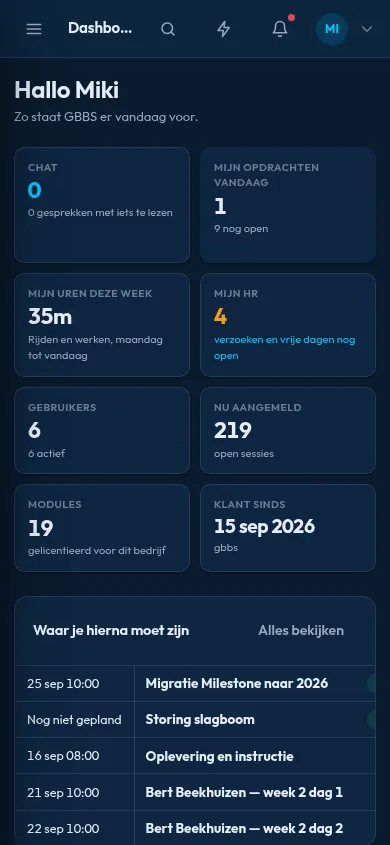
Dashboard for the day
Your planning at a glance

My jobs today

Planned work, addresses and job details for the technician.

Faults & dispatch

Report and follow faults, dispatch work orders from the phone.

Live map

See where the team is, with location sharing that people control.

Hours on the spot

Weekly timesheets against the roster, submitted from the phone.

Encrypted chat

End-to-end encrypted conversations with the whole team.

Own notifications

Push from your own server, no third-party service; self-updating app.

Made for people who are rarely at a desk

The PES Android app opens on your own server: enter its address once, sign in (with a passkey if you like) and the app keeps you up to date in the background. Technicians see their jobs and the way there, report a fault or book hours on the spot; planners dispatch and follow the team on the live map.

Notifications come straight from your PES server over a secure connection — no Google push service involved — and the app updates itself from that same server.

Feature tour

Every screen below is a real screenshot. Search for a feature or pick a chapter; click a picture to see it full size and page through them with the arrow keys.

01

Your day on the phone 4 screens

What is planned, what is waiting and what needs your answer — at a glance.

Dashboard for the day
PES on a phone

Dashboard for the day

The home screen summarises hours this week, open requests, active users and the appointments that need you next. Interface language follows the company setting; captures shown are Dutch.

How it works

The dashboard is a page of the PotoP Enterprise Suite served by your company's own server, shown in the app at phone width. Hours, open requests and appointments are read from the PostgreSQL database when the page loads and are limited to what the signed-in user's role may see. The interface language and the company's colours come from company settings on the server. The app itself only shows the page and adds notifications and biometric sign-in on top.
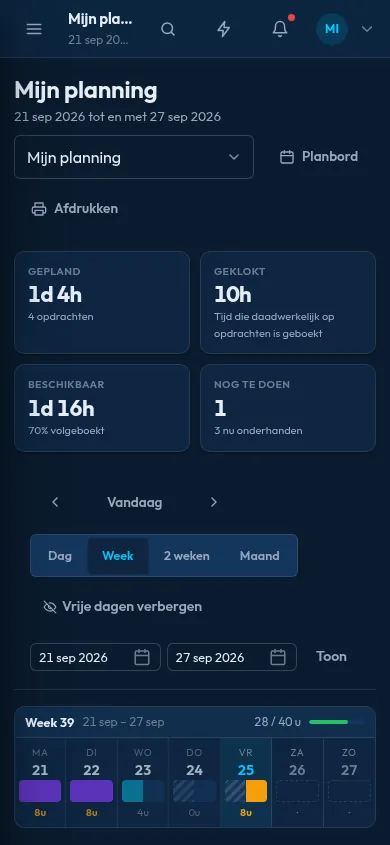
Your planning at a glance
PES on a phone

Your planning at a glance

Planned, worked and available hours for the week sit above a day-by-day calendar. Employees see their own schedule without asking the office.

How it works

Planned, worked and available hours are calculated by the server from the planning board, the recorded hours and the contract of the employee. The calendar shows only the signed-in person's own assignments, because permissions are checked on the server for every page. When the planner moves a job, the change appears here on the next load and can also trigger a notification. Nothing is planned on the phone, so office and field always see one version of the schedule.

Hours and leave
PES on a phone

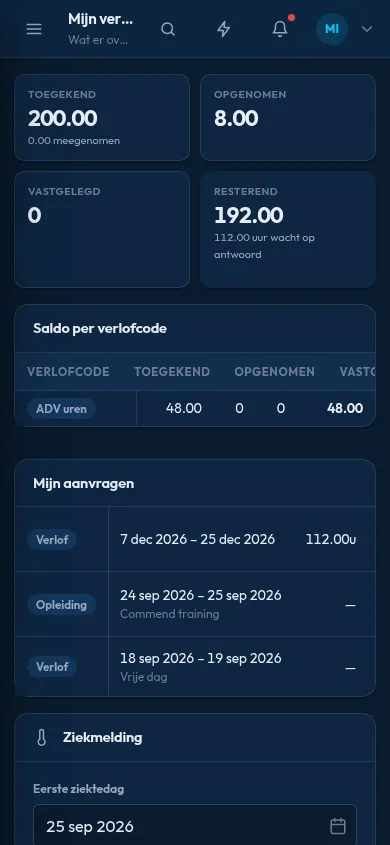
Hours and leave

Leave balances, requests and a personal overview are shown in cards. Requests are submitted from the phone.

How it works

Leave balances are computed by the server from the employee's contract, earlier requests and the company's rules. A request submitted here becomes a record in the company database with the status requested, and managers who may approve it are notified. Approval, rejection or withdrawal changes the balance immediately for everyone. The phone stores no leave data itself and only shows the page.

AI assistant with suggestions
PES on a phone

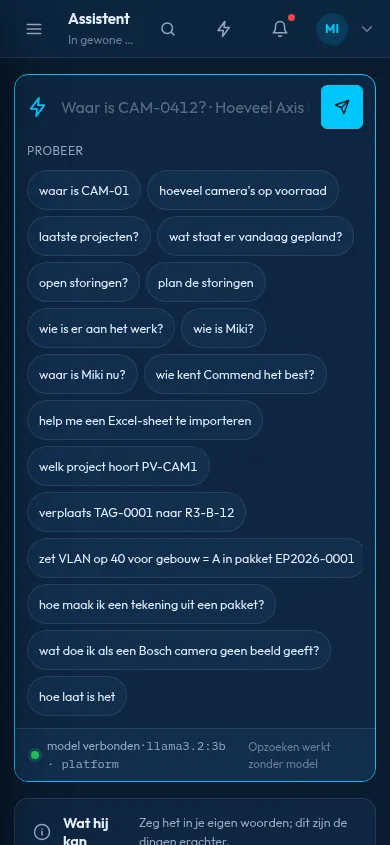
AI assistant with suggestions

Ask about projects, planning, storage or colleagues in plain words, or start from the suggested questions.

How it works

The assistant answers questions from the company's own data, such as projects, planning, storage and colleagues, using a language model that runs on the company's own hardware. The answer is built from database queries made with the permissions of the asking user, so it cannot reveal what the user could not open. Long questions are handled in the background and the reply is shown when it is ready. The suggested questions are starting points and can be replaced by free text.

02

Out in the field 5 screens

Jobs, faults, dispatch, the live map and your timesheet wherever you are.

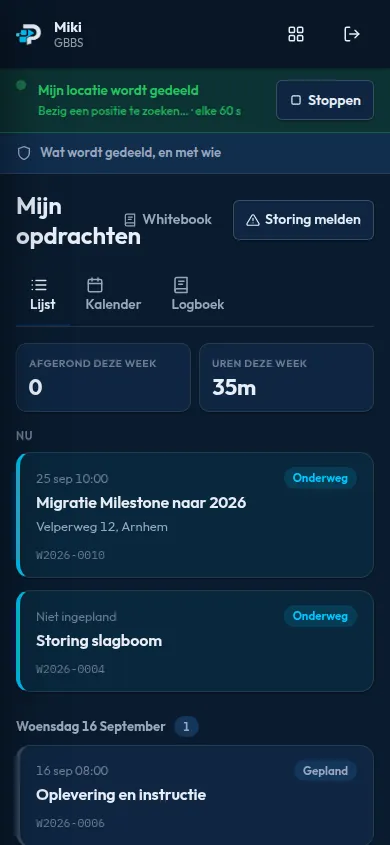
Field app: my jobs
PES on a phone

Field app: my jobs

Technicians see today's assignments with time, address and job number. They can share their location, report a fault or open a list, calendar or logbook.

How it works

The list is the technician's own work orders for today, taken from the planning board on the PES server. Address links open the phone's navigation app, and the number opens the dialler. Location is shared only after the user agrees in the app and in Android, and the browser engine reports it to the server. Reporting a fault creates a record in the company database, and files or photos can be attached with the phone camera.

Live map of the team
PES on a phone

Live map of the team

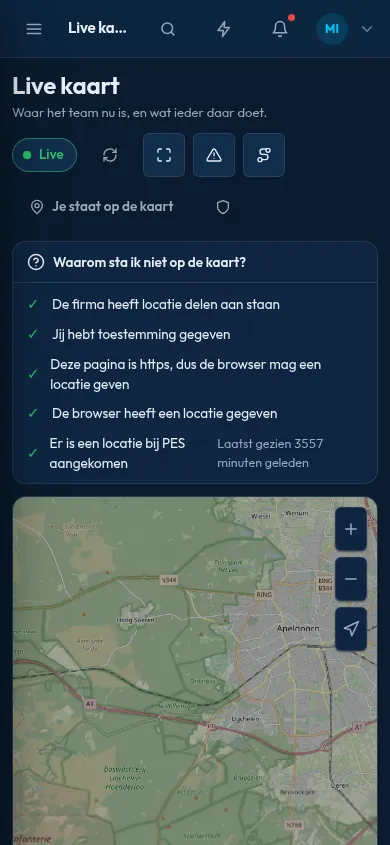
A live map shows where colleagues are, only when they choose to share their location. The screen states plainly what is shared and with whom.

How it works

Positions are sent by the phones of colleagues who have chosen to share, through the standard browser location function that Android permits per app. The server keeps the latest position and shows it on an OpenStreetMap-based map, only to users whose role allows it and only while the company setting for sharing is on. The checklist on the screen tests each condition, such as consent, HTTPS and a recent fix. Sharing can be switched off by the person at any time.

Faults and service calls
PES on a phone

Faults and service calls

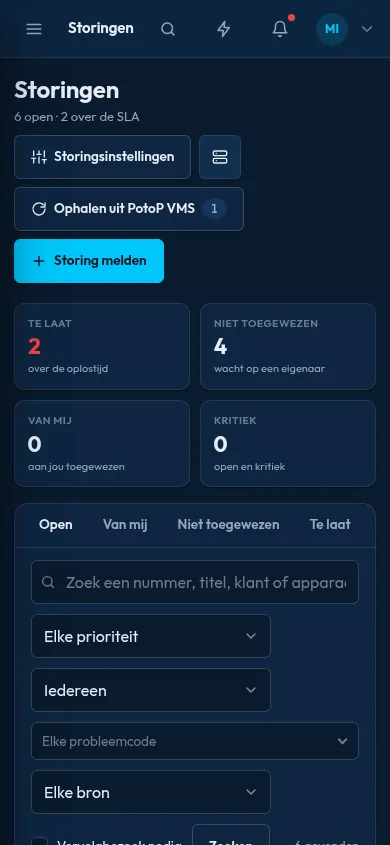
Faults are counted by urgency and SLA status, with filters for priority, technician and source. Overdue items stand out.

How it works

Faults are records in the PES database, entered by a person, a form or a linked PotoP VMS system that reports a device failure. The server calculates each fault's SLA deadline from its priority and marks it overdue when the time passes, and the counters at the top come from those results. Filters for priority, technician and source are applied on the server. Assigning a fault notifies the technician on the phone.

Dispatch from the phone
PES on a phone

Dispatch from the phone

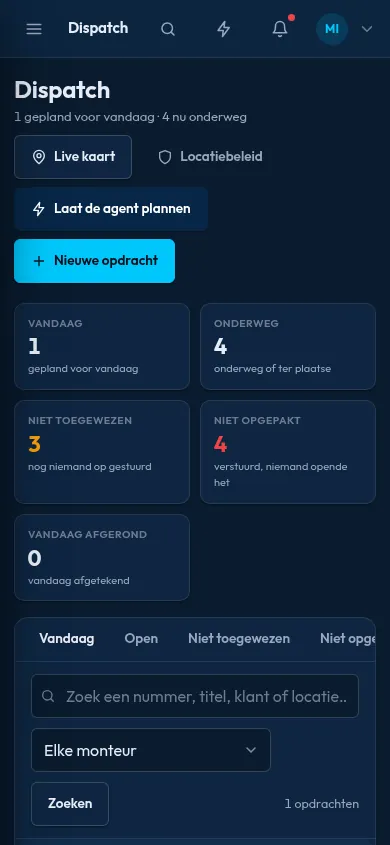
Dispatchers see who has jobs today, which are unassigned and which are late, and can open the live map or let the planning agent assign work.

How it works

The dispatch view combines the planning board with open work orders on the server: who has jobs today, which jobs have no technician and which are late. The planning agent proposes assignments using rules based on availability, skills, location and the existing schedule, and a dispatcher confirms. It runs on the server, and no data is sent to a cloud service. The live map opens from here and uses the same shared positions.

Weekly timesheet
PES on a phone

Weekly timesheet

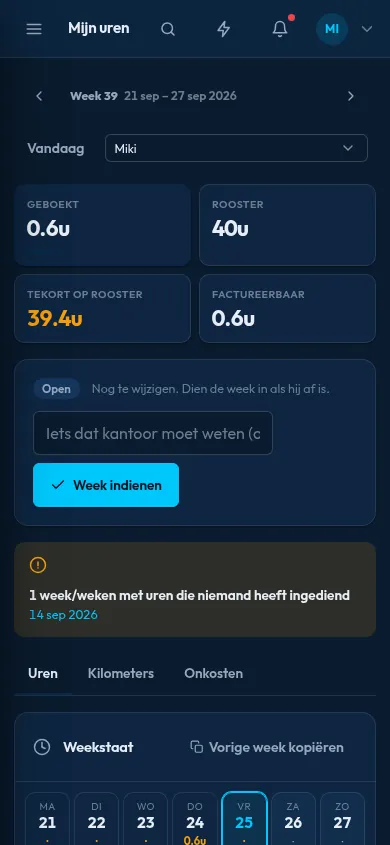
Hours booked, scheduled and billable are shown for the week, with submission at the end of it.

How it works

Booked hours come from time entries in the PES database, scheduled hours from the planning board, and billable hours from the project each entry belongs to. Submitting the week locks the entries and sends them to the approver, and the status is visible to both sides. The rules for rounding, overtime and approval are the company's settings on the server. The phone shows the page and stores no timesheet data of its own.

03

Chat & notifications 2 screens

Encrypted conversations and one place for every notification.

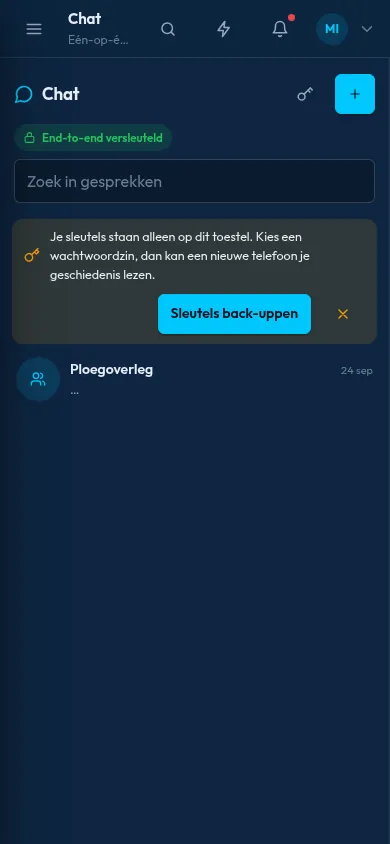
End-to-end encrypted chat
PES on a phone

End-to-end encrypted chat

Conversations are end-to-end encrypted, and keys can be backed up from the chat screen. Team messages stay inside your own system.

How it works

Messages are encrypted in the browser engine of the phone before they are sent and are decrypted only on the devices of the participants, using a Rust-based implementation of the Olm and Megolm ratchets. The server stores and forwards ciphertext and cannot read it. Keys stay on the device, and the backup option stores them encrypted with a passphrase so a new phone can read earlier messages. Attachments are encrypted too and saved to Downloads only after decryption on the phone.

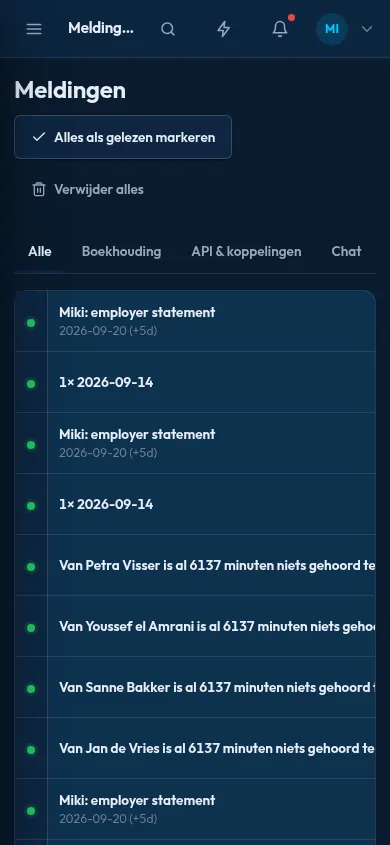
One notification centre
PES on a phone

One notification centre

Alerts from every module land in one list, filterable by category such as bookkeeping, integrations and chat. Items can be marked read or cleared.

How it works

Every module writes its alerts to one notification table on the PES server, filtered by the person's permissions, and this page lists them. The same items reach the phone as Android notifications through a long poll that the app keeps open to your own server, so there is no Google or Firebase in between. Reading an item on one device removes it on the others. The categories, such as bookkeeping or chat, are the module names, and each user can choose which ones alert them.

Under the hood

How PotoP Enterprise Suite for Android is built, where it runs and how it keeps your data safe.

01

Your server, verified HTTPS

At setup the app checks that the address is a genuine PES company portal over HTTPS with a valid certificate. Certificate errors are never clicked through, and only the portal's own address opens inside the app.

02

Passkeys and biometrics

Face or fingerprint sign-in uses Android's Credential Manager and WebAuthn passkeys. The server checks the app against a published association file, so a passkey cannot be used from another app.

03

Notifications without Google

A small foreground service holds a long poll to your own server, which answers as soon as a notification is written. It backs off when the network is bad, and a 15-minute job is the fallback. Calls ring full-screen on the lock screen.

04

Device token pairing

After you sign in, the app receives a device token and stores it encrypted with an Android Keystore key. Paired phones are listed on the sessions page, where they can be removed.

05

Updates from your portal

The portal offers the current app version, with a download button and QR code on the sessions page. The app checks the SHA-256 checksum before Android installs it, and only an update signed with the same key is accepted.

06

Server does the work

PES runs on your server with PostgreSQL. The phone shows the web application in a WebView and adds notifications, file saving, printing and location, each only for the portal's own origin.

Want to see PotoP Enterprise Suite for Android on your own site?

Tell us about your installation — we are happy to show you around or set up a trial.